About this Item
Building a portfolio website today is less about coding and more about choosing the right structure that feels flexible, fast, and visually strong. WordPress users often rely on Elementor template kits because they remove the design barrier and let creators focus on content instead.
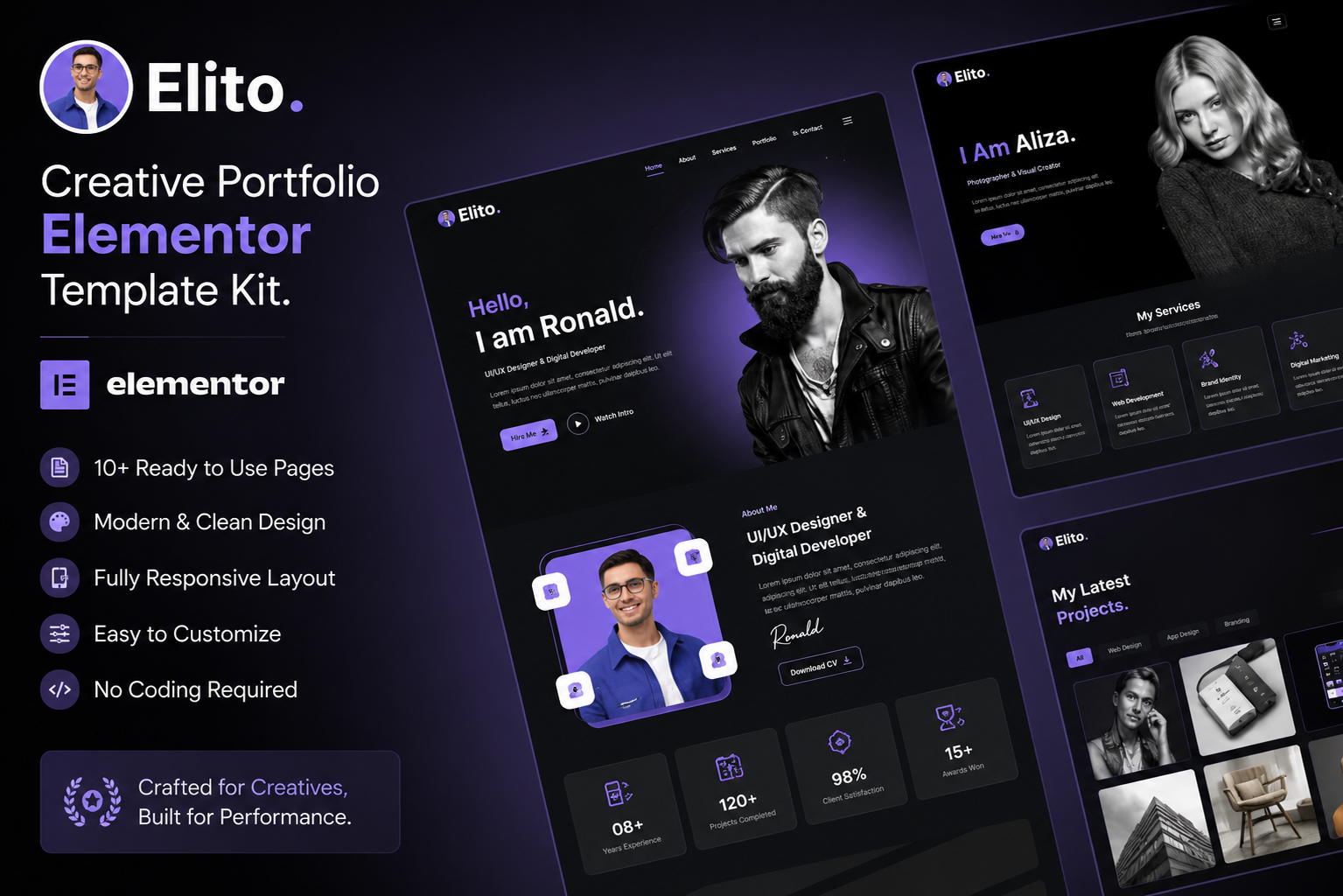
The Elito – Creative Portfolio Elementor Template Kit is one of those kits designed for freelancers, designers, agencies, and digital artists who want a modern portfolio without starting from scratch.
This guide breaks down what Elito actually offers, how it works in real projects, where it fits best, and what to watch out for before using it.
Quick Answer: What is Elito Creative Portfolio Elementor Template Kit?
The Elito Creative Portfolio Elementor Template Kit is a pre-designed set of Elementor pages and sections for WordPress. It helps users build a professional portfolio website quickly without coding. It includes homepage layouts, portfolio grids, about pages, contact forms, and reusable design blocks tailored for creative professionals.
What Makes Elito Template Kit Useful?
At its core, Elito is built for speed and visual presentation. Instead of designing each section manually, you import ready-made layouts into Elementor and customize them.
Key idea:
It reduces website setup time from days to hours while keeping design consistency.
Key Features of Elito Template Kit
1. Pre-Built Portfolio Layouts
Elito includes multiple portfolio styles such as grid, masonry, and modern card layouts. These are useful for showcasing design work, photography, branding projects, or UI/UX case studies.
2. Elementor-Based Editing
Everything is built using Elementor, meaning:
- Drag-and-drop customization
- No coding required
- Real-time editing
3. Responsive Design
Layouts automatically adjust for:
- Mobile phones
- Tablets
- Desktop screens
This is critical for portfolio websites since most traffic comes from mobile devices.
4. Lightweight Structure
The kit avoids heavy scripts and unnecessary animations, helping improve loading speed compared to overdesigned themes.
5. Ready Sections
Includes reusable sections like:
- Hero banners
- Service blocks
- Testimonials
- Contact forms
- Footer variations
6. Modern UI Style
The design trend focuses on:
- Clean typography
- Large white space
- Minimal color usage
- Strong visual hierarchy
Use Cases: Who Should Use Elito?
Freelancers
Designers, developers, writers, and photographers can build personal branding sites quickly.
Creative Agencies
Small agencies can use Elito to showcase client projects and case studies.
UI/UX Designers
The grid-based portfolio layouts are ideal for interface presentations.
Students & Fresh Graduates
Useful for building a professional portfolio without hiring a developer.
Digital Artists
Illustrators and 3D artists can present visual-heavy work effectively.
How to Install Elito Template Kit in WordPress
Step-by-step process:
- Install WordPress on your hosting
- Install and activate Elementor plugin
- Go to Elementor → Template Kits
- Upload the Elito kit file (usually JSON or ZIP format)
- Import global settings (fonts, colors)
- Import individual pages
- Replace demo content with your own
Tip:
Always import global settings first to maintain design consistency.
Comparison: Elito vs Traditional WordPress Themes
| Feature | Elito Template Kit | Traditional Theme |
|---|---|---|
| Setup Speed | Fast | Moderate |
| Customization | High via Elementor | Depends on theme options |
| Coding Required | No | Sometimes |
| Design Flexibility | Very high | Medium |
| Performance Control | User-managed | Theme-dependent |
| Learning Curve | Low | Medium |
Common Mistakes Users Make
1. Ignoring Global Settings
Many users customize pages individually and break design consistency.
2. Installing Too Many Plugins
Adding extra plugins slows down Elementor-based sites.
3. Not Optimizing Images
Portfolio sites often fail due to heavy image uploads.
4. Overusing Animations
Too many effects reduce performance and distract from content.
5. Using Default Demo Content
Leaving placeholder text makes the site look unprofessional.
Expert Tips for Better Results
- Use compressed images (WebP format preferred)
- Stick to 2–3 primary fonts only
- Keep homepage sections minimal
- Highlight 6–10 best portfolio items only
- Use consistent spacing across pages
- Add clear call-to-action buttons (Contact, Hire Me)
About “Free Download” Versions
Many users search for:
- Elito Creative Portfolio Elementor Template Kit free download
- Elito Creative Portfolio Elementor Template Kit nulled download
However, unofficial or nulled versions often come with:
- Security risks (malware injection)
- Missing updates
- Broken layouts
- No support from developers
A safer approach is always to use official sources or licensed marketplaces where the kit is maintained and updated properly.
Frequently Asked Questions (FAQs)
1. What is Elito Creative Portfolio Elementor Template Kit?
It is a pre-designed Elementor template system for building portfolio websites in WordPress without coding.
2. Is Elito suitable for beginners?
Yes, it is beginner-friendly because it uses drag-and-drop editing.
3. Do I need coding knowledge to use it?
No coding is required; Elementor handles all design work visually.
4. Can I customize colors and fonts?
Yes, global settings allow full control over branding elements.
5. Is it mobile responsive?
Yes, all layouts are optimized for mobile, tablet, and desktop devices.
6. Can I use it for agency websites?
Yes, it works well for small agencies showcasing projects and services.
7. What plugins are required?
Typically Elementor and Elementor Pro (depending on kit features).
8. Is it good for SEO?
Yes, if paired with proper optimization practices like fast hosting and image compression.
9. Can I use it for multiple websites?
Licensing depends on where you download it from; always check usage rights.
10. What are alternatives to Elito?
Other Elementor portfolio kits and themes like Astra Starter Templates or Envato-based kits.
Key Takeaways
- Elito is a ready-made Elementor portfolio template kit
- Designed for freelancers, agencies, and creatives
- No coding required, fully drag-and-drop
- Fast setup compared to traditional themes
- Performance depends on optimization practices
- Avoid unofficial “free download” versions due to risks
Conclusion
The Elito Creative Portfolio Elementor Template Kit is a practical solution for anyone who wants a clean, modern portfolio without dealing with complex design or development work. It works best when used with a clear content strategy and proper optimization.
If your goal is to build a professional online presence quickly, Elito offers a solid starting point—but like any template system, its final quality depends on how thoughtfully you customize it.